
Cm_blast
-
Posts
1,604 -
Joined
-
Last visited
-
Days Won
28


-
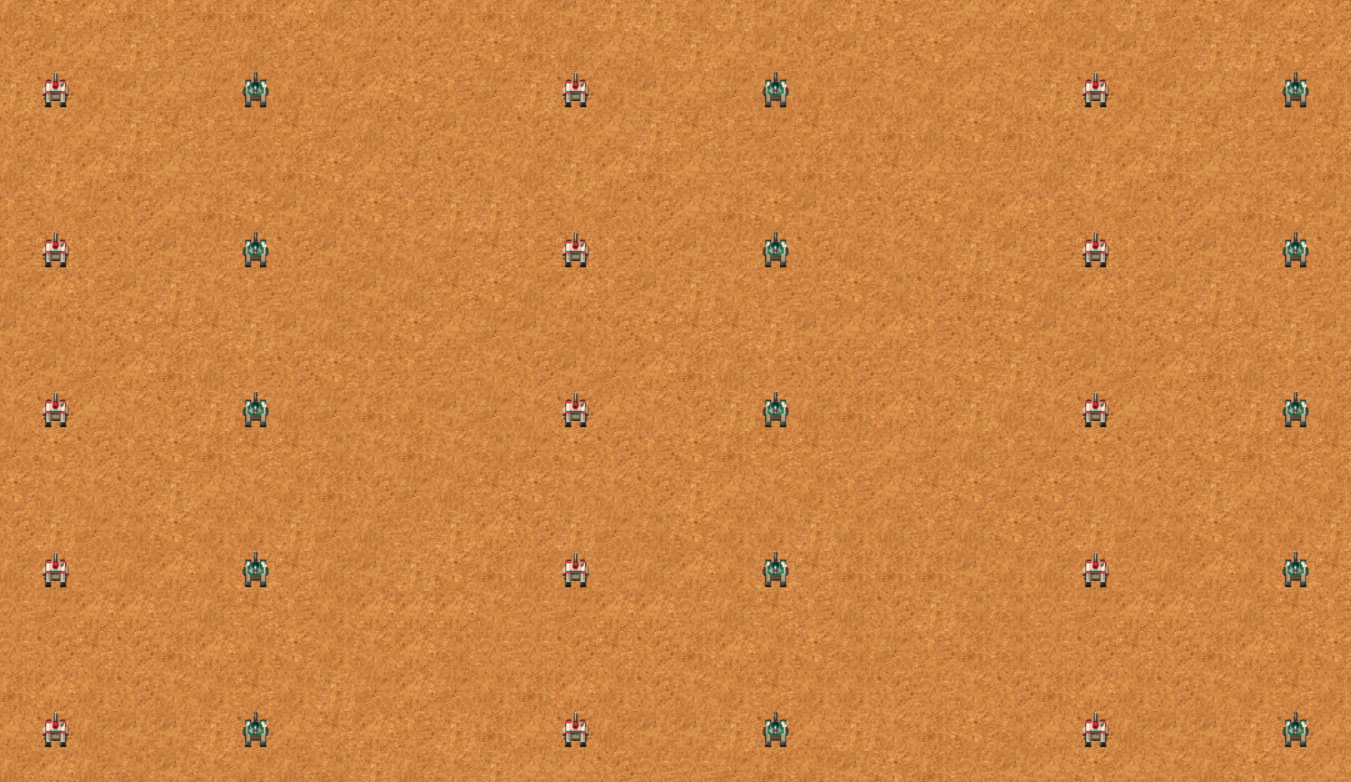
 I did this type of test years ago; honestly I may not remember well, maybe I was really wrong, but when I mean "survive with 1-2 shoots" may even be different tanks, not like always the Harkonne one. I don´t remember and don´t really care anymore. Anyway, as I mention, bullets have not 100% accuracy, they go slighly off, but if you really want to test, open the editor, set up like this, run the map and you can see. If you want to test more accurate, you can put them 1 tile next to each other, or you can use the advance placement to make them look at each other instead of up and having to turn, etc etc.

-
I mean that if you make 1 harkonnen tank and 1 ordos tank to fight each other 10 times, they will be even. bullets may not fully hit all the time, but the last time I even put multiple tanks against each other the tank that survived was 1 or 2 shoots away to die; this is assuming they shoot each other and nobody move, so in terms of dueling all 3 tanks are even. There is nothing of this in dune 2000, the health only changes the speed of the unit moves, not the firing ratio or the damage. The main thing I wanted to say to him, is that if you are a casual player that can barely win the game (as he has trouble even with cheats) I don´t consider the player microing anything, just selecting all the units and going face, and in this case, I can see Harkonnen tanks looking stronger than the Ordos tank (or just defending but you are not moving anything).
-
Ordos were always the weaker of the 3. In Dune 2, the game has a hidden difficulty based on the House selected. Harkonnen were the easier due the use of the heavy trooper and quads (no trikes nor upgrades needed), while ordos have the Raider which on that game were faster but also weaker, and the lack of missile tank. In dune 2000 they are more balanced. Ordos have the Raiders which here are better (faster moving, faster firing). Now, Ordos feels weak because their combat tank does the worst job ar being a combat tank. Harkonnen Combat tank has the highest health but the lowest ratio of firing. Ordos tank is the fastest both moving and shooting, but it has low hp, and Atreides are in the middle. If you put 10 Harkonnen tanks vs 10 ordos tanks (all in 1 vs 1 encounter) you will see that they balance each other. The Ordos tank attacks so fast that can kill the Harkonnen tank despite having way higher hp. Now, the main issue is that the combat tank job is to be an actual tank, so when you send a bunch of harkonnen combat tanks against the enemy turrets, and then other units like missile tanks or quads (which are strongest in terms of damage) is fine because those turrets will take a while to kill the tanks. However, in the same escenario but with Ordos tanks, Ordos tanks does more damage, but because they died faster, those turrets will start firing to your other units which you don´t want to, and they will die too, so turrets will survive. Also, siege tanks does no damage to turrets, they are a good anti-infantry, and as Ordos lack the missile tank, instead of "1 tanky unit and other 2 damage dealers (combat tank, missile tank, quad), you are stuck with 2 damage dealers units (combat tank, and quad) and no missile tank to help. As a suggestion, you can slow a bit the speed of the game, because if I am not wrong, the game is stored at the maximum speed posible (as most multiplayer people play that way, and others find the lower speed too boring), but originally it was intented to be player at at lower speed, and if the game shows in the screen "at 15 minutes, X happens" that timer shouldn´t just reach 0 in only 6 minutes. If you open the main menu you can move the speed slide twice to the left (this is assuming that it is on the max speed, I am not sure), if you do that, the game will be at the "real time speed", which means that if a crono on the screen marking 15 minutes appears, 15 real life minutes will pass; Reducing the speed will allow you to instead of just sending your 20 tanks and 20 quads ahead on whatever position/speed, you can control the units way better, grouping them, sending them more closers, sending the tanks first and then the quads or other units... at at razonable pace. Next time you go to attack the enemy (and if you are playing on a lower speed so that helps a lot), Apart for grouping and moving the units based on the type, you can send the tanks to aggro enemy turrets/siege tanks, and then sending your troopers, troopers will decimate any turret (and they barely does damage to them), sometimes troopers alone won´t be enough if the enemy have sieges or try to crush over, but if you send a group of other units to keep them busy, you can destroy the turrets with them, and then just go all in with everything else that you put next to the enemy base but not too close. <-- building a 200 units army can work, but if you use the units more carefully you can do lots of damage even with a small force, as long as you place the units well. I mention the speed, because I also play at at lower speed. I have done custom maps that because the speed I play, I can line my units as "4 missile tanks, 4 combat tanks, 4 quads, 4 infntry/troopers" and enemy sending a bunch of units and barely doing me any damage, and then playing the same mission on the fastest speed, and because there are too much things to focus (deploying, protecting from other attacks) I don´t have the time to line up those units in rows, so I just put them together in a chaotic way, which turns that the infantry/troopers are behind, the missile tanks are the in the front, and by the time I realize half my army is gone. Same map, same player, but the fastest or more lower speed can make the difference. Pd: Now, In dune 2, the Ordos were the "highest difficulty", but in dune 2000 they are balanced, as if you reach the lastest levels as Harkonnen, enemies will have massive bases with lots of turrets, while if you play as Ordos, while still lacking the same firepower as them, you will fight enemies with smaller bases and you will have an ally that will help you defending, on the offense too and sometimes even finishing enemies that you weakened (but if left unchecked may recover, but with your allies they will keep the pressure so that enemy never recovers).
-
Usually Ms-dos games have a "setup" so you can select soundblaster, adlib or other options, usually games come with soundblaster by default. I can send you that specific page that has the game portable and working (and I will tell you how to increase the cycles to avoid game slowing around past mission 3), or the harder way is you installing dosbox, downloading the game and doing all the Ms-dos commands required, depending on how you deal with that can be rather easy or hard. The easy game will be in spanish unfornatelly, but these may be the only options to play the original thing. Dosbox + game (and knowing to put commands), not extra things, but just know how to enter the folder and executing the game using Dos commands. Or... if you even have any windows 95/98/XP emulator that you use for other older windows games, game can work there way easier.
-
Ok so, if we stay strictly into the original Dune 2, the best way is to download the game from any abandonware site, and then running it using dosbox (Ms dos emulator). It require a bit of settings, and a couple of ms-dos commands, but you can get the original experience. There are pages that let you play on the browser, such as internet archive, but I have no idea if you can save, or if the game will run slower (this can also happens in dosbox, but in dosbox you can "speed up" the game). There is a spanish game that has the game as "repacked", which means you only need to download, unzip and just play, but I think by default is in spanish, don´t remember now if you can change anything to be in english. It will be the "dosbox" emulation but no Ms-dos commands needed. For the no oficial thing, I only know Dune Legacy and dune 2 the golden path or dune 2 the maker. I played the first, which use modern controls, but last time I played, because the enemy has so little economy (and with modern controls that´s not good enough), the AI started building multiple factories and I couldn´t past but a few levels due enemy sending plenty of units against me. I didn´t play the other 2, so I cannot tell how they are, but I remember hearing about them some years ago. This post was done 15 years ago, so it´s possible that things listed there no longer exist, but you can check what it is on their own. I usually stick with the dune 2 + dosbox setting and I only briefly toyed with any fan made dune 2. At least in that regard I can help you; maybe that spanish site editing a file is enough, or applying the only english on top of it, I don´t know, but considering that the objetive on all levels is "destroy everything but turrets/walls" language is not a big issue.
-
The usual to go on these things is to open the config file, there is an option in there that sais "single processor" or something along those lines. Try to unmark that and try again, if that doesn´t work try other options to mark/unmark and try again.
-
Are you sure the files you uploaded are the corrects? I wanted to check, and I found that every mission is exactly the same as the original, no more enemies, no different events, nothing at all. Only thing that it is changed is the briefing, that you put a few lines in there, but other than that, missions are 1:1 from the original.
-
yes, although if I recall on that mission there is not 1 but multiple enemies at once (even if they share land, base or whatever). If you open the editor, and open the mission settings (F10), if you deploy the "play as:" if you choose either Fremen, mercenaries or sandworm, you will play with around 1/3 of the enemy base. Now, you need to do extra steps. Let´s pretend you chose "Fremen", on the same windown, on the top right left, press the "Fre" tab and swap that value I marked to "0", just to avoid the Ai to control the units not letting you play. And then, if you want all the other 5 to actually play (as one of them were the human), let´s say that you are doing this on the Atreides campaign. In this case, go to the Harkonnen, ordos or imperial tab, press the "copy AI" on the bottom right, then you go on the Atr Tab and then you press "paste AI". If you don´t do that, the "atreides" side won´t do anything. This is the screen on how to change to play as: this is how to make an AI to stop being controlled by the AI to let you play. This is to make an AI that it was human controller to have the values other Ais has to at least being able to play.
-
if would be good if you specify at least which dune are you talking about: cryo´s dune, dune 2, dune 2000, dune emperor, frank herbert´s dune, dune spice wars...
-
Is the equivalent of playing on easy, normal and hard difficulty on the main game. So if you have 2 humans, one with handicap 1, and another with handicap 2, the first player will get tanks at the cost of 525 credits while for the 2º player tanks will cost the normal 700; plus on handicap 1 everything, buildings and units, builds faster. (and on handicap 3, everything is more expensive and slower to build). Take in consideration that if you play the original game skirmish mode, AI enemy controllers always plays on normal. However, if you play with the new modern lobbies (gruntmods-dunemaster), the AI will always play as handicap 1. Now, you can select the difficulty of the enemy AI, but this doesn´t change that the enemy AI tanks still will cost 525 credits; what the difficulty actually does is changing how much money the AI starts with. Easy: 3000 credits ; having a slow starts, just enough for barely having 1 refinery, running early out of money so it needs time to assemble a base. Normal: X credits, same as you set the lobby (so if you start with 7000, the AI also starts with 7000). hard: 40.000 credits; The AI has more than enough to deploy lots of structures but also enough refineries and harversters to not running out of money easily.
-
Option 1: check the config and check and uncheck multiple options until one works. Opcion 2: Try using dunemasters version (it is almost the same as gruntmods) Here you can find the all in one installer, it has the game and all the other 50 custom campaigns ever made. Both gruntmods and dunemasters are the same and both use almost all the same files, but for some reason 50% people can play gruntmods fine, while the other 50% game has issues and have to install dunemaster instead (and other times people installing dunemaster game doesn´t work, but gruntmod does). I would fully try the options on the config first, some options are like "use core affinity" I think or something along those lines that for some people game have issues until they disable it; you can also try with different resolutions and that kind of stuff, I don´t know for sure what makes the game to not start, but you can try with that, and if it doesn´t work, using dunemaster.
-
So, if you only want the base game (and I think a few custom campaigns) you can download and install gruntmods from here: https://gruntmods.com/dune_2000_gruntmods_edition And if you want 95% of the custom campaigns, missions and all the stuff download this instead: The 2º is a post with the "all in one" installer that somebody did with dunemaster, so you can download all in 1 single file, the file is very big so it may take some time to download it, but no need to worry on the very last .exe (unless maybe if you want to play some custom stuff very specific). But for the most part, the all in one is just to download, unzip and install and everything will work right away, it was done to have just that and not having to download extra stuff. This already includes 50 custom campaigns or around that number so... it has lots of stuff to play and will be applied all. One very important: care where you install the game, installing on certain folders may have issues with Windows, permits and stuff; just be sure to execute the game in admin mode. Loading certain missions it won´t matter, but if a custom campaign try to apply X mod, windows may partially block the mod (because the launcher will move, copy and delete files around, which lastests windows doesn´t like that much) going so far to even break the game. Maybe the mission looks like a huhe gibberish, and then even if you load any of the original westwood made maps they won´t load properly (random visuals, wrong units... so on) which may force you to reinstall from scratch again. Just exec as "admin" to be sure and you will fine.
-
were you using the original game, gruntmods version or dunemaster version? You can write any issues you have like "it doesn´t work because this error pop up" or something along those lines, or if you were trying to play the original campaigns or a custom ones and etc, the more info, the better. Gruntmods and dunemaster are practically the same, I cannot even tell the differences, but usually if one works, the other not. If you were using the original iso of the game, just try any of those 2, if you were using any of those two just open the config and mark and unmark all the options until there is one that click. And if that doesn´t help, if you had gruntmods install dunemaster or vicevera.
-
How do you delete a specific saved game
Cm_blast replied to Nyteshade12134's topic in Dune 2000 Support
Glad to help. For the future, the name on an user is on the top of the avatar, "Fedaykin" is just a range based on number of posts or something like that. If you check yourself your name "Nyteshade" is on top of the "N" picture, while below the range is just "Fremen". I mention this just in case another person write something and you think we are the same person (there is also an user that has the name "Feda" and may be confusing why are so many "fedas" around here). -
How do you delete a specific saved game
Cm_blast replied to Nyteshade12134's topic in Dune 2000 Support
There is an actual in game optiont that sais "delete save", just open the menu with the escape key while you are on the battlefield at any moment. you should have a load, a save and a delete option, you go in there and delete the ones you don´t need. Game will rename saves to have only the ones you actually want. Game probably loads saves from 0 to maximum, so if you manually delete any number it just doesn´t know because 1 is missing, but if you use the actual delete option on the game you don´t need to do that.